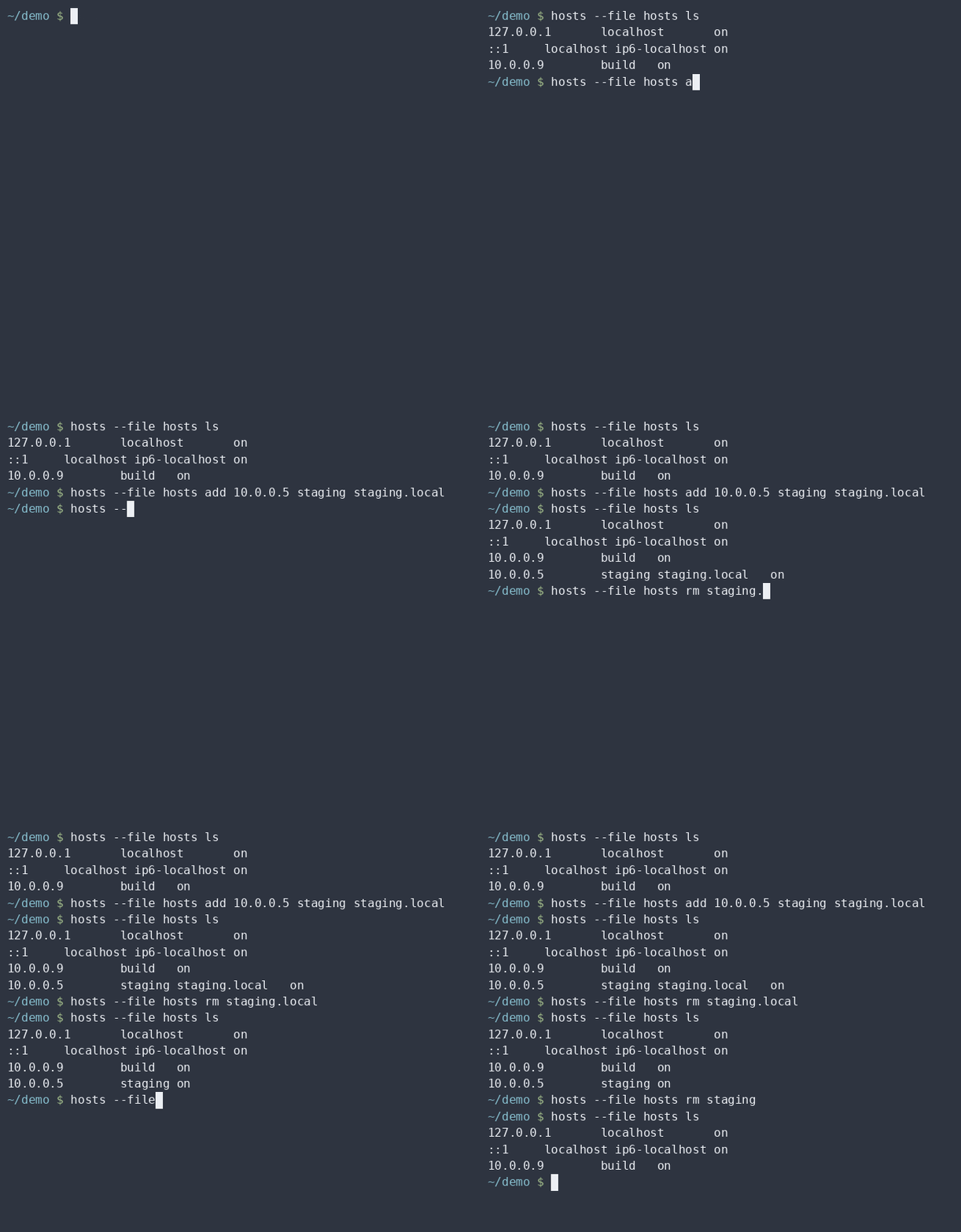
Overview
/etc/hosts is small enough that everyone edits it by hand,
and critical enough that a corrupted write breaks name resolution on the
whole machine. hosts makes the common operations immediate
without giving up safety.
- Every write goes to a temporary file in the same directory, is validated, and is then moved into place with an atomic rename.
- Owner, group and permissions of the original file are preserved.
- An automatic, rotated backup is taken before every mutation, so any change can be rolled back.
- Input is validated before anything touches the file, and invalid input is rejected with a dedicated exit code.
- Read commands never require root.
Status
This is 1.1.0. The major version is a promise rather than a
claim that the work is over: breaking any of the following costs a new
one.
- The exit codes
0to8. -
The tab-separated text output of
ls,search,check,backup ls,profile lsandflush, including the number of fields. - The JSON schema, which carries its own
versionfield. - The rule identifiers of
check. - The environment variables and the layout of the backup and profile stores, including the sidecar format.
| Wave | Commands | Status |
|---|---|---|
| 1 | ls, get, search,
check, export |
released in 0.1.0 |
| 2 | backup, backup ls,
restore, diff |
released in 0.2.0 |
| 3 | add, rm, on,
off |
released in 0.3.0 |
| 4 | edit, import, block |
released in 0.4.0 |
| 5 | profile save, profile load,
profile ls, profile rm |
released in 0.5.0 |
| 6 | flush, shell completions |
released in 0.6.0 |
| 7 | Debian package and APT repository | released in 1.0.0 |
| 8 | Verification: interruption, concurrency, hostile input, four distributions | released in 1.0.1 |
| 9 | check --fix |
released in 1.1.0 |
Requirements
- Linux with GNU coreutils.
- Bash 4.4 or newer. The program refuses to run on anything older, and the suite is run on every push against Debian 11 and 12 and Ubuntu 22.04 and 24.04, which is bash 5.1 and 5.2. 4.4 is the documented floor, not a tested one: nothing still supported ships it.
Two soft dependencies, neither of which stops the program working:
-
diff, from diffutils, for thediffcommand and for the preview shown by--dry-run. Its absence is reported rather than worked around badly. -
flock, from util-linux, to serialise concurrent writers. Without it writes are not serialised, which can lose an update but cannot damage the file.
There is no other runtime dependency: no jq, no Python, no
external libraries.
Installation
Debian and Ubuntu
curl -fsSL https://n36l3c7.github.io/hosts-cli/apt/hosts-cli.asc \
  | sudo gpg --dearmor -o /usr/share/keyrings/hosts-cli.gpg

echo 'deb [signed-by=/usr/share/keyrings/hosts-cli.gpg] https://n36l3c7.github.io/hosts-cli/apt stable main' \
  | sudo tee /etc/apt/sources.list.d/hosts-cli.list

sudo apt update
sudo apt install hosts-cli
The repository is signed, and signed-by limits that key to
this repository alone rather than adding it to the system-wide keyring.
Nothing here asks you to write trusted=yes, which would
turn the authenticity check off.
The package installs the command, the man page and the completions for
bash and zsh. Every release is also attached to
GitHub
Releases, the .deb included.
From source
git clone https://github.com/n36l3c7/hosts-cli.git
cd hosts-cli
sudo make install
This installs the script to /usr/local/bin/hosts, the man
page to /usr/local/share/man/man1/hosts.1, and the
completions alongside them. Override the destination with
PREFIX or DESTDIR:
make install PREFIX="$HOME/.local"To remove it:
sudo make uninstall
make deb builds the Debian package from the same
artifacts, if you would rather install it that way.
Usage
hosts ls                          # every active entry
hosts ls '*.local'                # filtered by a glob on the names
hosts get staging                 # just the address, ready to capture
hosts search "staging box"        # match on address, names or comments
hosts check                       # lint the file
hosts --file ./hosts.new check --strict
sudo hosts check --fix            # repair what has only one repair

sudo hosts add 10.0.0.5 staging staging.local
sudo hosts off staging            # keep the line, stop it resolving
sudo hosts on staging             # and bring it back
sudo hosts rm staging

sudo hosts backup                 # keep a copy before editing by hand
$EDITOR /etc/hosts
hosts diff                        # see what changed since that copy
sudo hosts restore --yes          # and go back

man hosts
Command line reference
| Command | What it does |
|---|---|
ls [pattern] |
List entries. With a pattern, only entries carrying a name that
matches that shell glob; matching ignores case. -a or
--all includes disabled entries,
--disabled selects only those.
|
get <hostname> |
Print the addresses a hostname points at, one per line and nothing else. Only active entries are considered, because a commented out entry takes no part in name resolution. Exits with 5 when the name is not in the file. |
search <text> |
Find entries whose address, names or comment contain the text. Matching is on substrings and ignores case; disabled entries are included. |
check |
Lint the file. --strict makes a warning fail as an
error does, and --fix repairs the findings that have
only one possible repair.
|
export |
Write the file to stdout, byte for byte, or as a structured
document with --json.
|
add <ip> <name>... |
Point names at an address. Adding what is already there changes nothing. A missing name joins the line that already carries the others on the same address; names that are nowhere go on a new line. Names spread over several lines are refused, because merging them is your decision. |
rm <name|ip> |
Take a name off every line that carries it, dropping a line left with nothing but its address, or remove every line pointing at an address. Exits with 5 when nothing matches. |
on <name> |
Enable every disabled entry carrying the name. |
off <name> |
Comment out every active entry carrying the name, keeping the
line so on can bring it back.
|
edit |
Open the file in an editor, check what comes back, and install it atomically after taking a backup. The editor works on a copy, so the file is never left half written. |
import [file] |
Merge entries from a file, or from standard input. The source is checked before anything is written, and one bad line makes the whole import fail. |
block <domain>... |
Point domains at a sinkhole address. With no argument the domains are read from standard input, one per line. |
profile save <name> |
Keep the file as it is now under a name. Saving over a name that
exists is refused unless --force is given.
|
profile load <name> |
Bring that state back. What it replaces is kept first, so the
load can be undone with restore.
|
profile ls |
List the profiles: name, time, size in bytes. |
profile rm <name> |
Delete one. Asks first, since nothing else holds a copy. |
flush |
Clear the cache of the system resolver, where there is one that can be cleared without disturbing anything. |
backup |
Take a backup. This only reads the file, so it needs no privilege on it; what it needs is somewhere to write the copy. A backup identical to the most recent one is not taken. |
backup ls |
List the backups already taken, most recent first, as four tab separated fields: index, identifier, time, size in bytes. |
restore [id] |
Put a backup back in place, the most recent one by default.
id is either the index shown by
backup ls or an identifier in full. The content about
to be replaced is backed up first, so a restore can itself be
undone.
|
diff [id] |
Compare the file with a backup. Removed lines are what the backup holds, added lines what the file holds now. Exits with 0 whether or not there are differences. |
Every command accepts --help.
Global options
Accepted before and after the command name.
| Option | Effect |
|---|---|
--file <path> |
Operate on a file other than /etc/hosts. A symbolic
link is followed: the write lands where it points rather than
replacing the link with a regular file.
|
--json |
Machine-readable output. |
--dry-run |
Show what would happen and write nothing. The exit status is the one the real run would have had. |
--no-backup |
Skip the automatic backup. Not advisable. |
--force |
Go ahead with something that would otherwise be refused. |
-y, --yes |
Answer yes to the confirmations. Without a terminal and without this, a confirmation is refused rather than assumed. |
-q, --quiet |
Silence diagnostics. Never the data. |
-v, --verbose |
Print diagnostics on standard error. |
-h, --help |
Show help, general or of a command. |
-V, --version |
Show the version. |
Output format
Diagnostics go to standard error, data to standard output. The text
output of ls and search is four tab-separated
fields, always in this order and always this many, on a terminal exactly
as in a pipe:
address <TAB> names <TAB> on|off <TAB> comment
Nothing is aligned, coloured or paginated, and no option changes the
number of fields, so cut -f1 is always the address and
awk -F'\t' '$3=="off"' always selects the disabled entries.
check rules
An error is something the resolver will get wrong or silently ignore; a
warning is something untidy or merely suspect. check has to
be usable in continuous integration against files it did not write, so
anything with a legitimate reading stays a warning.
| Rule | Severity | --fix |
Meaning |
|---|---|---|---|
invalid-line |
error | no | not an address followed by a hostname |
invalid-ip |
error | no | the address does not parse |
invalid-hostname |
error | no | the name breaks RFC 1123 |
control-character |
error | no | the line contains a control character |
duplicate-entry |
error | yes | an earlier line is identical |
duplicate-name |
warning | yes | the name already points at that address |
conflicting-ip |
warning | no | the name points elsewhere in the same family |
nonstandard-hostname |
warning | no | the name uses an underscore |
missing-loopback |
warning | yes | no active 127.0.0.1 localhost |
missing-loopback6 |
warning | yes | no active ::1 localhost |
missing-trailing-newline |
warning | yes | the file does not end with a newline |
The same name on an IPv4 and on an IPv6 address is normal dual stack and is not reported: a rule blind to the address family would flag every healthy Linux machine. Rules that compare lines ignore disabled entries, which resolve nothing.
Findings are printed on standard output in the format compilers use, so the error parser of an editor can consume them directly:
/etc/hosts:14: error: duplicate-entry: identical to the entry on line 12
/etc/hosts: warning: missing-loopback6: no active entry maps ::1 to localhost
Fixing
--fix repairs the findings whose repair the finding itself
forces, and only those — the five marked in the table above. It
removes a duplicate entry, takes a redundant name off a line and drops
the line if that leaves it with nothing but an address, adds a missing
loopback entry above the first entry the file has, and adds a missing
final newline.
The rest are left alone on purpose. An address or a name that does not
parse cannot be repaired without inventing one.
conflicting-ip is the one that tempts: two lines send a
name to two addresses, and which of them is wanted is knowledge the file
does not contain. control-character is left because
stripping bytes out of a line in silence would destroy the evidence of
what happened to it.
sudo hosts check --fix              # repair what has one repair
hosts --file ./hosts.new check --fix --dry-run
After a fix the file is read and scanned again rather than the earlier
findings being patched up, so every line number and every message refers
to the file as it now is, and anything a fix introduced would be
reported too. What is left is printed as usual and still decides the
exit code: hosts check --fix in continuous integration
fails exactly when something a person has to look at is still there.
Fixing is a write like any other in this program: it takes a backup
first, honours --dry-run and --no-backup, and
asks before touching more than one line unless --yes is
given. A file with nothing to fix is not written to at all.
Addresses and names
Addresses are validated as inet_pton does, which is
stricter than the historic inet_aton: an octet with a
leading zero is rejected rather than read as octal, because the two
readings disagree. An IPv6 zone identifier
(fe80::1%eth0) is accepted, because a link-local address
without one is ambiguous.
Hostnames follow RFC 1123. A trailing dot is rejected: an entry in a hosts file is not a DNS wire name. Comparisons ignore case; the file keeps whatever case it had.
A commented line is read as a disabled entry when its fields look like one: an address, at most four names, and every name a plausible hostname. Prose that happens to start with an address stays a comment.
Exit codes
Exit codes are part of the public interface: a value keeps its meaning
for the whole 1.x line. Values greater than or equal to 64
are reserved and never returned.
| Code | Meaning |
|---|---|
0 |
Success, including an operation that changed nothing. |
1 |
Generic error, such as a target file that is not there. |
2 |
Usage error: unknown command, unknown option, or a missing argument. |
3 |
Insufficient permissions to read the file or write where it lives. |
4 |
Invalid input, or check found errors. |
5 |
The requested hostname or backup is not there. |
6 |
Refused because --force was not given. |
7 |
Write abandoned, the result could not be trusted, nothing was written. |
8 |
The operation was not confirmed. |
A missing target file is 1 and not 5 on
purpose: get uses 5 for a hostname that is
absent, and a script must be able to tell the two apart.
8 covers both a declined prompt and a confirmation that
could not be asked for. Without a terminal and without
--yes, the answer is refused rather than assumed: the
behaviour does depend on the environment, but only ever in the safe
direction.
JSON output
--json is accepted by ls, get,
search, check and export. The
schema carries a version field and is part of the public
interface. Bytes outside ASCII are passed through unchanged, so comments
stay readable.
Fields are added within a schema version and never change meaning or
disappear without the version being raised, so a reader should ignore
what it does not recognise rather than reject it.
summary.fixed on check arrived that way in
1.1.0.
{
  "version": 1,
  "file": "/etc/hosts",
  "entries": [
    {
      "line": 12,
      "kind": "entry",
      "enabled": true,
      "ip": "10.0.0.5",
      "family": "inet",
      "canonical": "staging",
      "aliases": ["staging.local"],
      "comment": "staging box",
      "raw": "10.0.0.5\tstaging staging.local # staging box"
    }
  ]
}
check --json replaces entries with
summary and findings;
export --json reports every line, comments and blank lines
included, distinguished by kind.
Editing entries
add points names at an address, rm takes them
away, and off and on comment a line out and
back in without deleting it. Three rules are worth knowing because each
of them rejects the obvious answer.
The same name on IPv4 and IPv6 is never a clash.
hosts add fd00::5 staging when 10.0.0.5 staging
exists is ordinary dual stack, not a conflict. A rule blind to the
address family would refuse the most ordinary operation there is on a
machine that has both.
off, on and rm act on
every line carrying the name. Turning off half of a dual-stack
pair would leave the name resolving on the other family: a command doing
half its job. Refusing to choose would be worse still, because it would
fail on the correct hosts file of every Linux machine.
A name already pointing elsewhere is refused rather than
moved. --force moves it, and when the line carries
nothing but the names being added the address is changed in place, which
is both what updating means and the smallest possible diff. A disabled
entry for the name is refused too, since hosts on is
usually what was meant.
rm of something that is not there exits 5. A
typo should not pass for success.
Minimal diffs
A change never rebuilds the file from what was parsed out of it. It says which lines it replaces, which it deletes and what it appends, and every other line is written back exactly as it was read. There is no path through the code that could reformat a line nobody asked to touch.
Within a line the edit is surgical too. Removing an alias takes the token and exactly one run of adjacent whitespace, so
10.0.0.5 staging staging.local # staging boxbecomes
10.0.0.5 staging # staging box
and not 10.0.0.5<TAB>staging # staging box.
off followed by on gives back the original
line byte for byte.
Blocking domains
block points domains at a sinkhole address. Both
0.0.0.0 and :: are used unless
--ipv4-only says otherwise: on a machine with IPv6, a block
that only covers IPv4 blocks nothing at all, which is the mistake most
blocklist tools make. With no arguments the domains are read from
standard input, one per line, since a real blocklist does not fit on a
command line.
Blocked domains live together at the end of the file:
# >>> hosts block >>>
# Managed by hosts(1): change it with "hosts block" and "hosts rm".
0.0.0.0	ads.example.com
::	ads.example.com
# <<< hosts block <<<
Marking the section off lets a blocklist of tens of thousands of
machine-written lines be treated as one thing. ls leaves it
out unless you pass --blocked, so the handful of entries you
actually maintain are not buried under it, and check does
not compare its lines with each other, since near-identical generated
names would be nothing but noise. The per-line rules still apply, and
get, search and rm treat what is
inside exactly as they treat anything else. Nothing about the section is
magic, and the markers go away with the last entry in it.
A domain that already has an entry outside the section is skipped with a
warning rather than making the whole command fail. That is deliberately
unlike add, which refuses: a command handed many domains
should not give up at the first obstacle.
What a blocklist costs
Measured on a file of 50,003 lines, against a typical
/etc/hosts of three:
| typical file | 50,003 lines | |
|---|---|---|
ls |
29 ms | 11.1 s |
get |
29 ms | 9.7 s |
check |
30 ms | 14.0 s |
Blocking 25,000 domains in one pass takes 2.8 s, so the bulk operation
itself is not the problem. The problem is that afterwards the file
is that big, and every command pays for reading it,
ls included even though it does not show the section. Bash
costs roughly 200 µs per line whatever the parser does.
This is a known limit, not a surprise, and the fix is a change of
strategy rather than tuning, so it is not bolted on here. If you keep a
large blocklist in /etc/hosts, a dedicated DNS-level
blocker will serve you better today.
Writing
Every change goes to a temporary file in the directory of the target, is validated, and is then moved into place with a rename. The kernel performs a rename within one filesystem atomically, so what is guaranteed is this:
After a change the file holds either the whole of the old content or the whole of the new one, never a mixture. That holds through a crash or a power cut.
What is not guaranteed is that the new content survives
a power cut in the moment right after the rename: Bash cannot call
fsync, so the directory entry cannot be forced to disk. The
failure mode of that is finding the old file, which is a lost change,
never a damaged one. Saying so plainly is better than implying a
durability the tool cannot deliver.
Owner, group, permissions and SELinux context are carried over before
the file is installed. The SELinux part is not decoration: a file
created in /etc inherits etc_t by type
transition while /etc/hosts is net_conf_t, and
a rename keeps whatever context the new file has, so without copying it
across a confined service on an enforcing system can stop resolving
names.
An extended ACL cannot be carried over by a rename, so a file that has
one is refused with exit 6 unless --force is
given. Losing an ACL changes who can read and write the file, which is
too quiet a way to change a permission.
Concurrent writers are serialised with flock when it is
there. The lock is taken before the file is read and
held until the new content is in place, which is the part that matters:
two writers that both read before either writes each compute their
change from the same starting point, and the second rename then throws
the first change away. Serialising only the writes would prevent
nothing, because the rename had already made those indivisible —
the update that gets lost is lost during the read. There is a test that
runs two writers at once against a file large enough for the race to be
certain rather than merely possible.
hosts edit holds that lock for as long as the editor is
open. Another writer waits ten seconds and then fails saying so, which
is the right outcome: the alternative is discarding one of the two
changes.
Without flock writes are not serialised at all, and a
concurrent write can lose an update — but it still cannot damage
the file, because the rename is atomic either way. A lock built out of
mkdir was considered and rejected: it would have to guess
whether a leftover lock belongs to a live process, and guessing wrong
leaves the tool stuck for good, which is worse than the problem it
solves.
Backups
A backup is taken before every change, unless --no-backup
says otherwise. Backups live in one directory per target file, each a
byte-for-byte copy with a sidecar of metadata beside it:
target=/etc/hosts
time=2026-07-27T12:34:56Z
mode=644
owner=root
group=root
sha256=6b604eae8902aea3b14f7b6d49f208116854a8a8c8ae33618a1ad8062462aca2
The copy is deliberately plain, so that in an emergency the file can be
put back with cp, knowing nothing about this program.
The sidecar is what makes restoring safe. It records the absolute path
the backup came from, and restore refuses when that is not
the file it is about to write: without that check, a backup taken with
--file from a scratch file could later end up over
/etc/hosts. The recorded SHA-256 is verified before
anything is written, and is also what tells an unchanged file from a
changed one, without which a run of writes that change nothing would
push every backup that matters out of the rotation window.
restore backs up the content it is about to replace, so a
restore can itself be undone. Only the content is restored: ownership
and permissions stay as they are now, and the sidecar keeps the original
ones for reference.
Profiles
A profile is a snapshot of the whole file kept under a name, so a known state can be brought back later. It is not an overlay: loading one replaces what is there.
sudo hosts profile save work
sudo hosts profile load home
hosts profile ls
A profile and a backup are the same object with different lifetimes.
Backups are taken automatically before every change and rotate away;
profiles are made on purpose and stay until you delete them, which is
why they live apart, under /var/lib/hosts/profiles.
Everything that makes a backup safe applies unchanged: the copy is byte
for byte, the sidecar records the file it came from, and the checksum is
verified before anything is written.
profile load keeps what it is about to replace, so it can
be undone with hosts restore like any other change. Saving
over a name that exists is refused unless --force is given,
and deleting one asks first, because nothing else holds a copy.
A profile name becomes part of a filename, so it may hold only letters, digits, dot, dash and underscore, may not begin with a dot or a dash, and is at most 64 characters. That is safety, not tidiness.
Clearing the resolver cache
hosts flush clears the cache of the system resolver. Often
there is nothing to clear, and that is not a failure:
The C library has no DNS cache of its own. Without a caching daemon in the path, a change to
/etc/hostsis already in effect.
That sentence is probably the most useful thing the command can say to
someone wondering why their change "has not worked", so it says it and
exits 0.
Only flushes that cannot disturb anything are performed:
systemd-resolved and nscd. dnsmasq, unbound and BIND are reported with
the command that would reload them, and left alone — restarting a
resolver can drop the network of the machine, which is a worse outcome
than a stale cache entry and not what anybody expects from a command
called flush. --force does not change that.
Caches kept by browsers are theirs, not the system's, and are not
touched.
$ hosts flush
systemd-resolved	flushed
dnsmasq	needs-attention	not reloaded here, since that can drop the network: systemctl reload dnsmasq
Shell completion
Completions for bash and zsh are installed by
make install.
Profile names and backup identifiers are always offered: producing them
means listing a directory. Hostnames are different, because producing
them means reading and parsing the file, and on a file holding a large
blocklist that takes seconds and would leave the shell looking hung. So
they are offered only while the file is under
HOSTS_COMPLETION_MAX_LINES, counted with wc,
which reads but does not parse.
Configuration
| Variable | Default | Meaning |
|---|---|---|
HOSTS_BACKUP_DIR |
/var/backups/hosts |
where backups are kept |
HOSTS_KEEP_BACKUPS |
20 |
how many to keep per file |
HOSTS_PROFILE_DIR |
/var/lib/hosts/profiles |
where profiles are kept |
HOSTS_COMPLETION_MAX_LINES |
5000 |
largest file for which completion offers hostnames |
The most recent backup is never removed, whatever
HOSTS_KEEP_BACKUPS says. If the backup directory cannot be
written, the command fails with exit 3 and names the
variable to set, rather than quietly putting backups somewhere you would
not think to look for them.
Development
The shipped program is a single self-contained script assembled from the
modules in src/, so development stays modular while
distribution stays a matter of copying one file. Never edit
build/hosts directly.
make build      # assemble build/hosts and build/hosts.1
make lint       # shellcheck on the script, mandoc on the man page
make test       # bats suite, run against the built script
make clean
The toolchain is shellcheck, mandoc and bats:
sudo apt-get install shellcheck mandoc bats
The test suite always runs against the built script and against fixture
files passed with --file. It never requires root and never
touches the real /etc/hosts.
Performance
| File | ls |
check |
|---|---|---|
a typical /etc/hosts, 10 lines |
21 ms | 23 ms |
| a 50,000-line blocklist | 7.5 s | 10 s |
For the size /etc/hosts actually is, the tool is instant. A
blocklist of tens of thousands of entries is not: Bash costs roughly
150 µs per line whatever the parser does, and no tuning inside the
loop changes that order of magnitude. Bulk handling of blocklists
arrives with block and import, which will use
a single awk pass where it wins.