A content pack
Bundle a connector, its mappers, a script, a playbook and a list into one pack, install it on another Nik, and ship an update.
The pack. example-alerts: the Example Alerts connector, its mappers, the UrlRisk script, a playbook that comments the risky links of a fetched alert back on it, and a list of hosts. You can make it in two ways: from the screens (Make a pack…), or as a folder you keep in a repository. Both give the same file.
You need
The Admin role (content.manage): Platform settings › Automation › Content packs.
What goes in a pack
| Folder | Item | Named by |
|---|---|---|
connectors/<id>/connector.yml |
A connector, with logo.png (or logo.svg) and README.md beside it |
Its id |
mappers/<connector>.json |
The mappers of a connector, and the classifier a new instance starts with | The connector's id |
scripts/<Name>.yml |
A script | Its name |
playbooks/<slug>.json |
A playbook: its current graph and its limits | Its name |
lists/<name>.json |
A list, with its items only when you choose | Its name |
fields/, incident_types/, dashboards/, preprocess_rules/ |
Fields, types, dashboards, pre-processing rules | Their names |
A pack never carries an instance, a credential, the hosts a playbook may reach or an opened class of data: those belong to the Nik they are set in.
Way 1: make it from the screens
- Build and test the items on your Nik first (the connector, its mappers, the script, the playbook).
- Platform settings › Automation › Content packs, press Make a pack….
- Give its id
example-alerts, NameExample Alerts, Version1.0.0, Author, Description. - Choose the items. What they need comes with them (Comes with them, because they need it): the playbook brings its script and its connector. Tick Lists go with what they hold only when the items of a list are yours to share.
- Download:
example-alerts-1.0.0.nikpack.
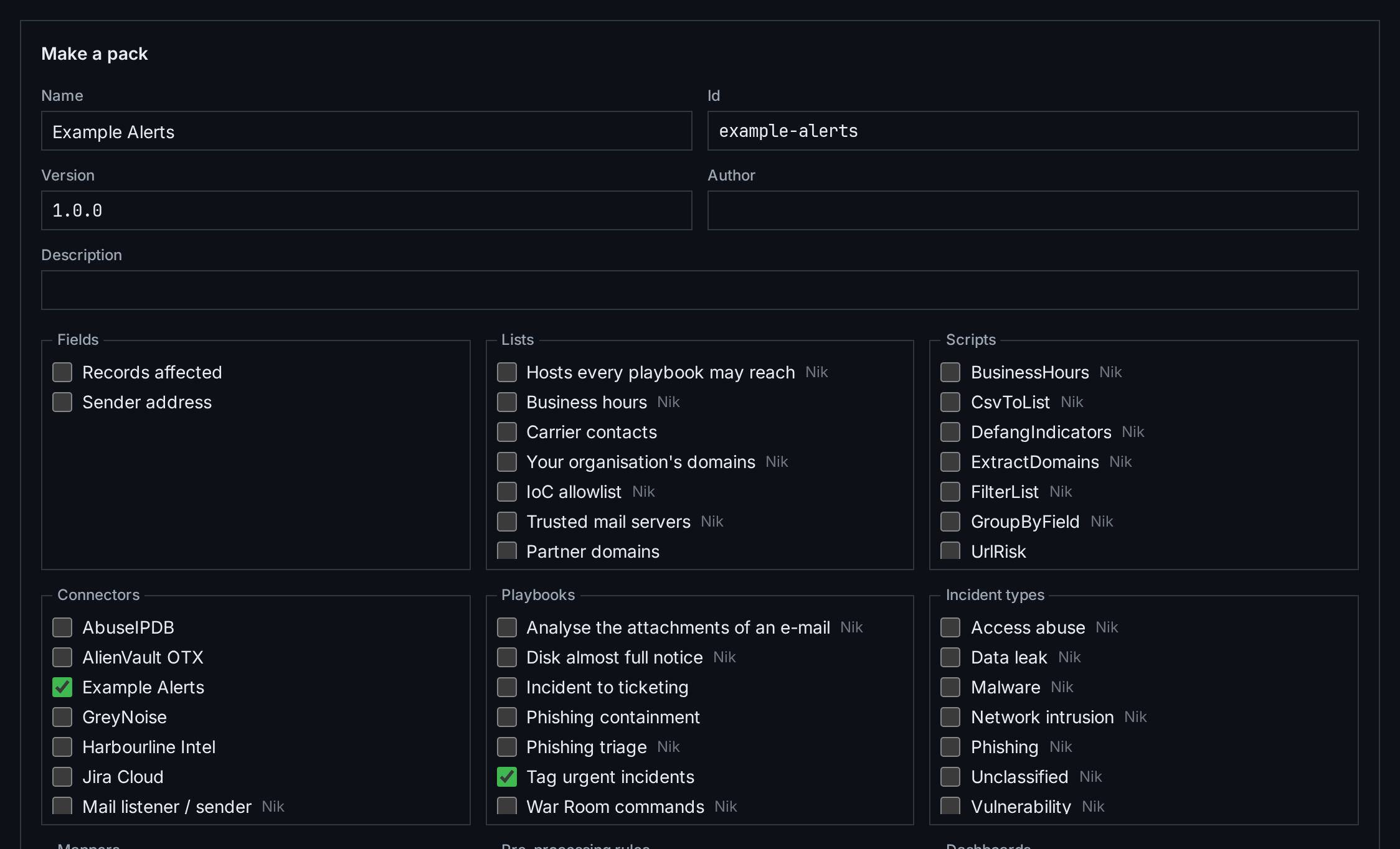
A .nikpack is a zip: unzip it into a folder to keep it in a repository, and go on with Way 2 for the next versions.
Way 2: write it as a folder
example-alerts/
├── pack.yml
├── connectors/
│   └── example-alerts/
│       ├── connector.yml
│       └── README.md
├── mappers/
│   └── example-alerts.json
├── scripts/
│   └── UrlRisk.yml
├── playbooks/
│   └── comment-risky-links.json
└── lists/
    └── example_alerts_hosts.json
pack.yml
id: example-alerts
name: Example Alerts
vendor: Example
category: Alerting
tags: [alerts, ip]
version: 1.0.0
description: Alerts of Example Alerts as incidents, kept in step; their risky links commented back.
author: Your team
nik: ">=6.10"
| Key | Rule |
|---|---|
id |
A lower-case letter, then lower-case letters, digits or - (2 to 49). Never change it: updates find the pack by it |
version |
Three numbers. Raise it at each change: a Nik offers an update only for a higher version |
tags |
Lower-case words, 8 at most: what the product is, what it works on. The catalogue filters by them |
vendor, category |
The catalogue groups cards by vendor |
nik |
>= and the oldest Nik it is for (">=6.10"). A pack for a later Nik is not offered |
requires |
Packs to install first: - { pack: other-pack, version: 1.0.0 } |
The connector
connectors/example-alerts/connector.yml is the file of An integration (connector), unchanged. Beside it, a README.md says what it was written against and what an instance needs, and a logo.png (256 KB at most) marks it.
The mappers
mappers/example-alerts.json:
{
  "connector": "example-alerts",
  "incoming": [
    { "to": "name", "from": "{{ item.title }}" },
    { "to": "details", "from": "{{ item.description }}" },
    { "to": "severity", "from": "{{ item.severity }}" },
    { "to": "status", "from": "{{ item.status }}" },
    { "to": "host", "from": "{{ item.host }}" },
    { "to": "source_id", "from": "{{ item.id }}" },
    { "to": "Alert(val.ID == obj.ID)",
      "from": { "ID": "{{ item.id }}", "Name": "{{ item.title }}", "Severity": "{{ item.severity }}", "Source": "Example Alerts" } }
  ],
  "outgoing": [
    { "to": "title", "from": "{{ incident.name }}" },
    { "to": "status", "from": "{{ incident.status }}" }
  ],
  "classifier": { "rules": [], "defaultType": null }
}
Add "authoritative": true to an incoming rule for Wins over edits. "types": { "Phishing": { "incoming": [...] } } holds a mapper for one type. The classifier is what a new instance starts with: rules of { "when": {...}, "type": "<type id>" }.
The script
scripts/UrlRisk.yml (the code is the one of A script):
name: UrlRisk
description: Finds the web addresses in a text and scores each on signs of a lure.
arguments:
  - { name: text, type: any, required: true, description: "A text, or a list of texts" }
  - { name: threshold, type: number, description: "The score from which an address is risky (50)" }
outputs:
  - { name: urls, type: list, description: "Every address: Data, Host, Score", context_path: "URL(val.Data == obj.Data)" }
  - { name: risky, type: list, description: "The risky ones, with their reasons" }
  - { name: count, type: number, description: How many addresses }
test:
  args: { text: "Pay at http://bank.example@198.51.100.7/inv, or https://login.example.com/a. New: http://secure-update.zip/x" }
code: |
  import re
  from urllib.parse import urlsplit

  URL = re.compile(r"https?://[^\s<>\"']+", re.IGNORECASE)
  SUSPICIOUS_TLDS = {"zip", "top", "xyz", "click", "country", "gq"}


  def judge(url):
      parts = urlsplit(url)
      host = (parts.hostname or "").lower()
      reasons = []
      if re.fullmatch(r"[0-9.]+", host):
          reasons.append("an IP address as host")
      if host.startswith("xn--") or ".xn--" in host:
          reasons.append("punycode")
      if host.rsplit(".", 1)[-1] in SUSPICIOUS_TLDS:
          reasons.append("a suspicious top-level domain")
      if "@" in parts.netloc:
          reasons.append("a user name before the host")
      if len(url) > 150:
          reasons.append("a very long address")
      return host, min(100, 25 * len(reasons)), reasons


  def main(args):
      given = args.get("text") or ""
      texts = given if isinstance(given, list) else [given]
      found = []
      for text in texts:
          for url in URL.findall(str(text)):
              url = url.rstrip(".,;)")
              if url not in found:
                  found.append(url)
      urls, risky = [], []
      for url in found:
          host, points, reasons = judge(url)
          urls.append({"Data": url, "Host": host, "Score": points})
          if points >= int(args.get("threshold") or 50):
              risky.append({"url": url, "score": points, "reasons": reasons})
      print(f"{len(urls)} addresses, {len(risky)} risky")
      return {"urls": urls, "risky": risky, "count": len(urls)}
The playbook
playbooks/comment-risky-links.json. A script node names the script, not a version: the version installed is used.
{
  "app": "Nik", "type": "playbook", "version": 1,
  "playbook": {
    "name": "Comment risky links on the alert",
    "description": "An incident fetched from Example Alerts whose details hold risky links gets a comment on its alert. Before turning it on: choose the instance in the node Comment on the alert; an admin opens Results of scripts for this playbook.",
    "maxRunsPerHour": 60, "onePerObject": true, "maxSeconds": 86400, "approvalDefault": true,
    "graph": {
      "nodes": [
        { "id": "start", "kind": "trigger", "name": "An incident is created", "position": { "x": 60, "y": 40 },
          "config": { "event": "incident.created", "manual": true } },
        { "id": "from_alert", "kind": "condition", "name": "From Example Alerts?", "position": { "x": 60, "y": 160 },
          "config": { "all": [{ "left": "{{ context.Alert[0].Source | default('') }}", "op": "eq", "right": "Example Alerts" }] } },
        { "id": "risk", "kind": "script", "name": "Score the links", "position": { "x": 60, "y": 280 },
          "config": { "script": "UrlRisk", "args": { "text": "{{ incident.details | default('') }}" } } },
        { "id": "any_risky", "kind": "condition", "name": "Anything risky?", "position": { "x": 60, "y": 400 },
          "config": { "all": [{ "left": "{{ risk.risky | length }}", "op": "gt", "right": 0 }] } },
        { "id": "comment", "kind": "action", "name": "Comment on the alert", "position": { "x": 60, "y": 520 },
          "config": { "action": "example-alerts.add-comment", "connection": "",
                      "args": { "id": "{{ incident.source_id }}",
                                "text": "Nik: risky links {{ risk.risky | pluck('url') | defang | join(', ') }}" } } }
      ],
      "edges": [
        { "from": "start", "to": "from_alert" },
        { "from": "from_alert", "port": "yes", "to": "risk" },
        { "from": "risk", "to": "any_risky" },
        { "from": "any_risky", "port": "yes", "to": "comment" }
      ],
      "inputs": [], "outputs": []
    }
  }
}
The node of a connector names no instance ("connection": ""): the playbook arrives as a draft until someone chooses one there. It arrives off in any case.
The list
lists/example_alerts_hosts.json (a name of lower-case letters, digits and _):
{
  "name": "example_alerts_hosts",
  "label": "Example Alerts: hosts to watch",
  "description": "Hosts whose alerts are handled first.",
  "kind": "values",
  "itemType": "host",
  "writableByAutomation": false,
  "entries": [{ "value": "dc01.corp.example" }]
}
kind is values, key_value or json. Leave entries out to ship the list empty.
Zip it
The files go at the root of the zip, pack.yml first level:
Install it from a file
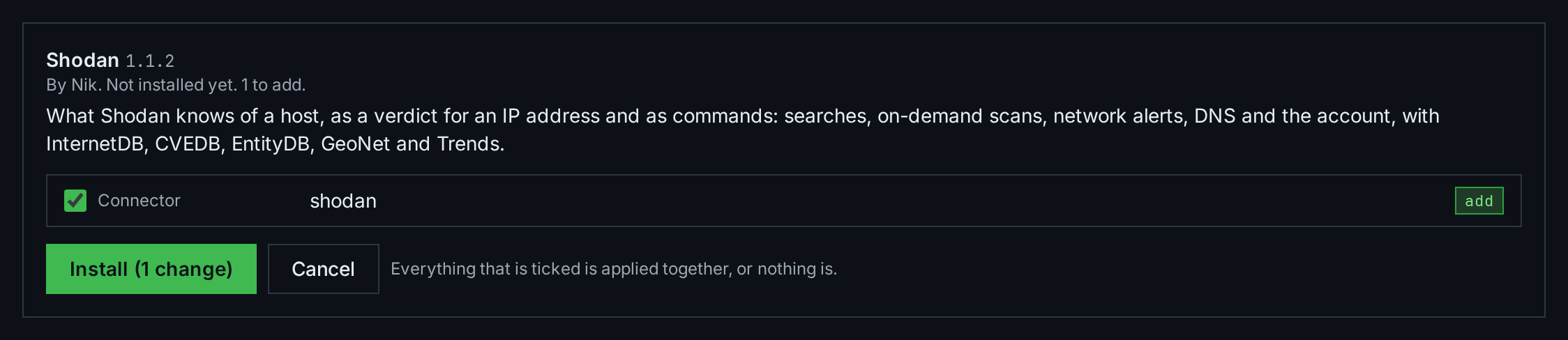
- On the other Nik, Platform settings › Automation › Content packs, press Upload a .nikpack… and choose the file.
- Nothing changes yet. Each item is listed with add, update, same or conflict. Read the difference of the script: it is code that will run in the sandbox.
- Press Install. Everything is applied in one transaction: all of it, or nothing.
| The pack is refused, or an item says | Fix |
|---|---|
The version of a pack is three numbers: 1.0.0 |
version: 1.0.0, not 1 or 1.0 |
"nik" says the oldest Nik the pack is for: ">=4.6" |
Write ">=6.10", with the quotes |
"tags" is a list of lower-case words (a letter, then letters, digits or -): [ticketing, itsm] |
Lower-case tags, 8 at most |
connectors/example-alerts: … |
The connector file has a problem: the message is the checker's (Install it) |
| conflict on an item | A field of another type, an older connector than the installed one…: leave it out or settle it |
Then, on that Nik:
- Make an instance of the connector (Add an instance); it starts with the pack's classifier.
- Open the playbook, choose the instance in Comment on the alert, save a version.
- An admin opens Results of scripts in the playbook's Settings › Data that may leave (the comment carries what the script returned), then turns it on.
Ship an update
- Change what you need (a command, a mapper row, the script).
- Raise
versioninpack.yml(1.0.1) and, if the connector file changed, its ownversiontoo. - Zip and upload it again. The card says update; See what changes… shows each item's difference line by line.
- Install. A playbook or a script gets a new version; a version in use is never rewritten. What someone changed on that Nik shows as update: they can leave it out to keep theirs.
Publish a catalogue
Nik's own catalogue is built from the folder packs/ of its repository by a workflow that runs, on every change:
It writes one .nikpack per pack, index.json, and index.json.sig, an Ed25519 signature with the key in PACKS_SIGNING_KEY, then uploads them to the release packs. Nik reads only a signed index, and takes a pack only when its size and SHA-256 match it.
To serve a catalogue of your own:
- Make an Ed25519 key pair. Put the private key (base64 of its 32 bytes) in
PACKS_SIGNING_KEY. - In the backend container:
python -m app.pack_build <folder of packs> <folder to write>. - Serve the folder over HTTPS.
- On each Nik, Catalogue address…: the address of
index.json, and the public key (base64).
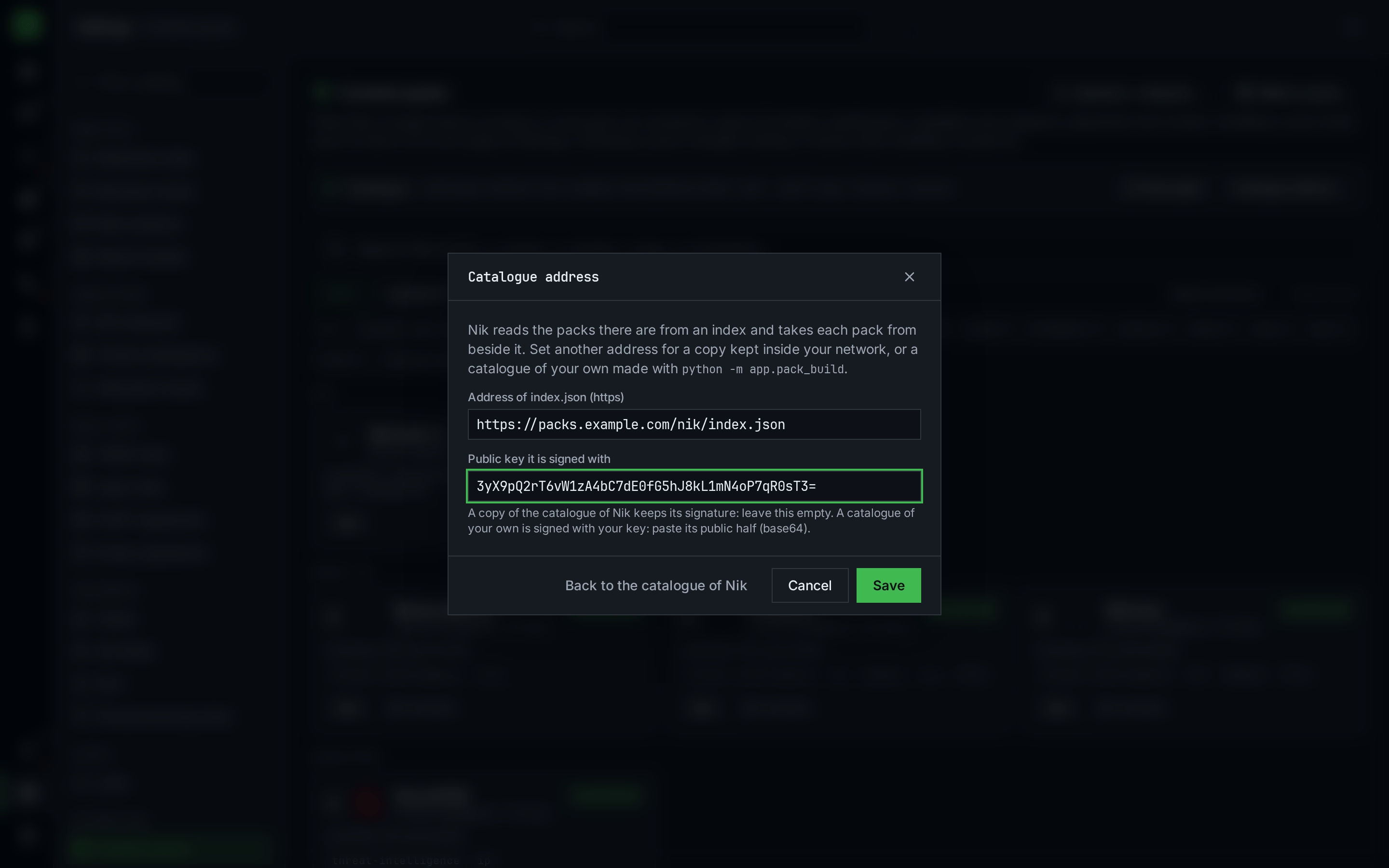
A folder set in NIK_PACKS_DIR is installed at start without signature: it is the administrator's. See Content packs.