A playbook from scratch
Build a playbook for a real need, test it without risk, turn it on and read what it did.
The need. When a phishing incident comes in: find the indicators in it, check each with the threat-intelligence sources, and if one is malicious tag the incident, assign it, and ask a person before putting the malicious values on a block list.
What you will have at the end:
flowchart TD
  t(["Trigger: An incident is created"]) --> c1{"Phishing?"}
  c1 -- no --> e1(["End"])
  c1 -- yes --> mk["Make indicators of a text"]
  mk --> each["For each indicator"]
  each -- for each item --> rep["Reputation of an indicator"]
  each -- when done --> c2{"Anything malicious?"}
  c2 -- no --> e2(["End"])
  c2 -- yes --> tag["Tag the incident"] --> as["Assign the incident"] --> note["Add a note"]
  note --> ap{{"Approval: Block them?"}}
  ap -- approved --> block["Add to a list: Blocked"]
  block -- on error --> fail["Add a note: Blocking failed"]
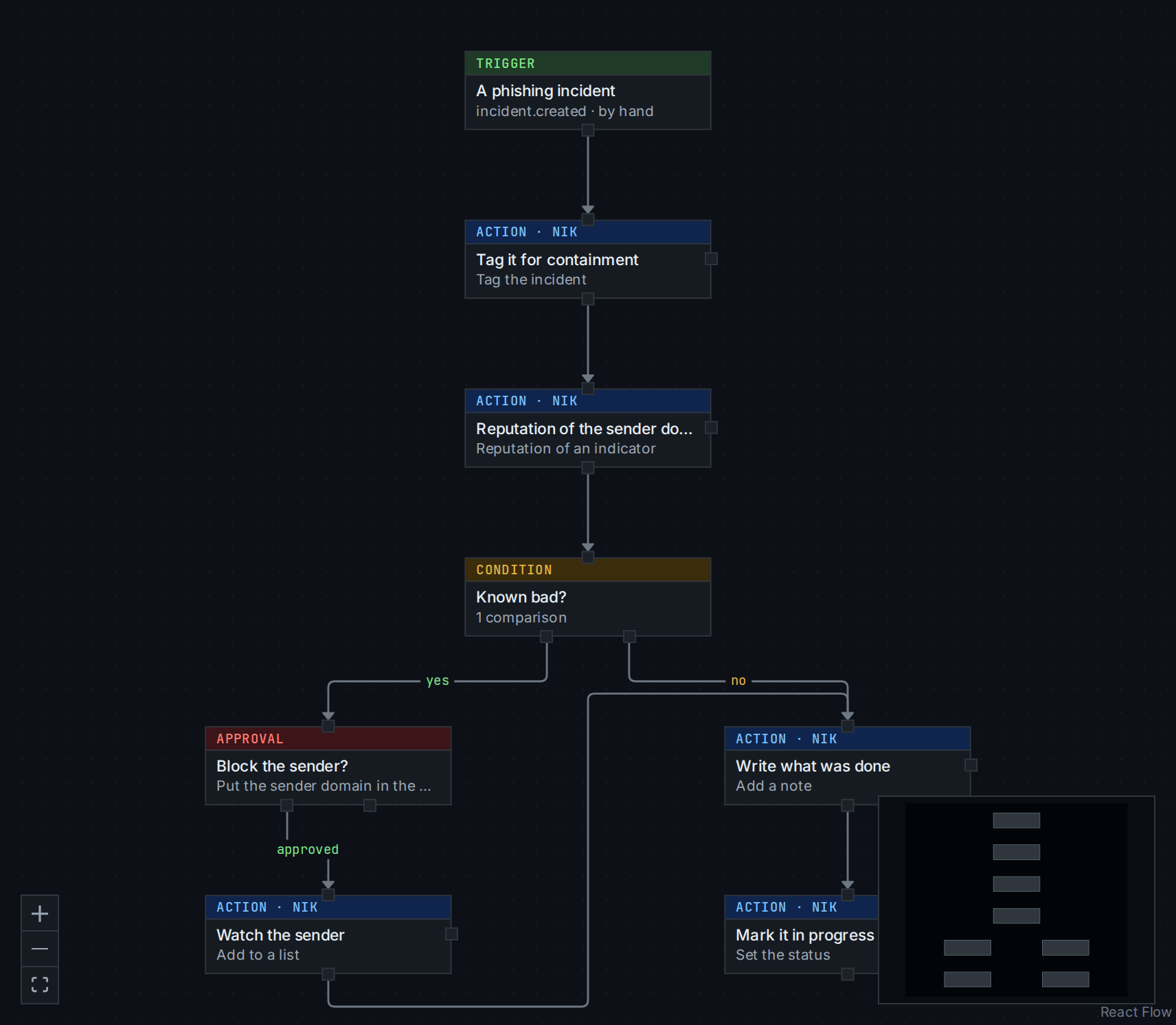
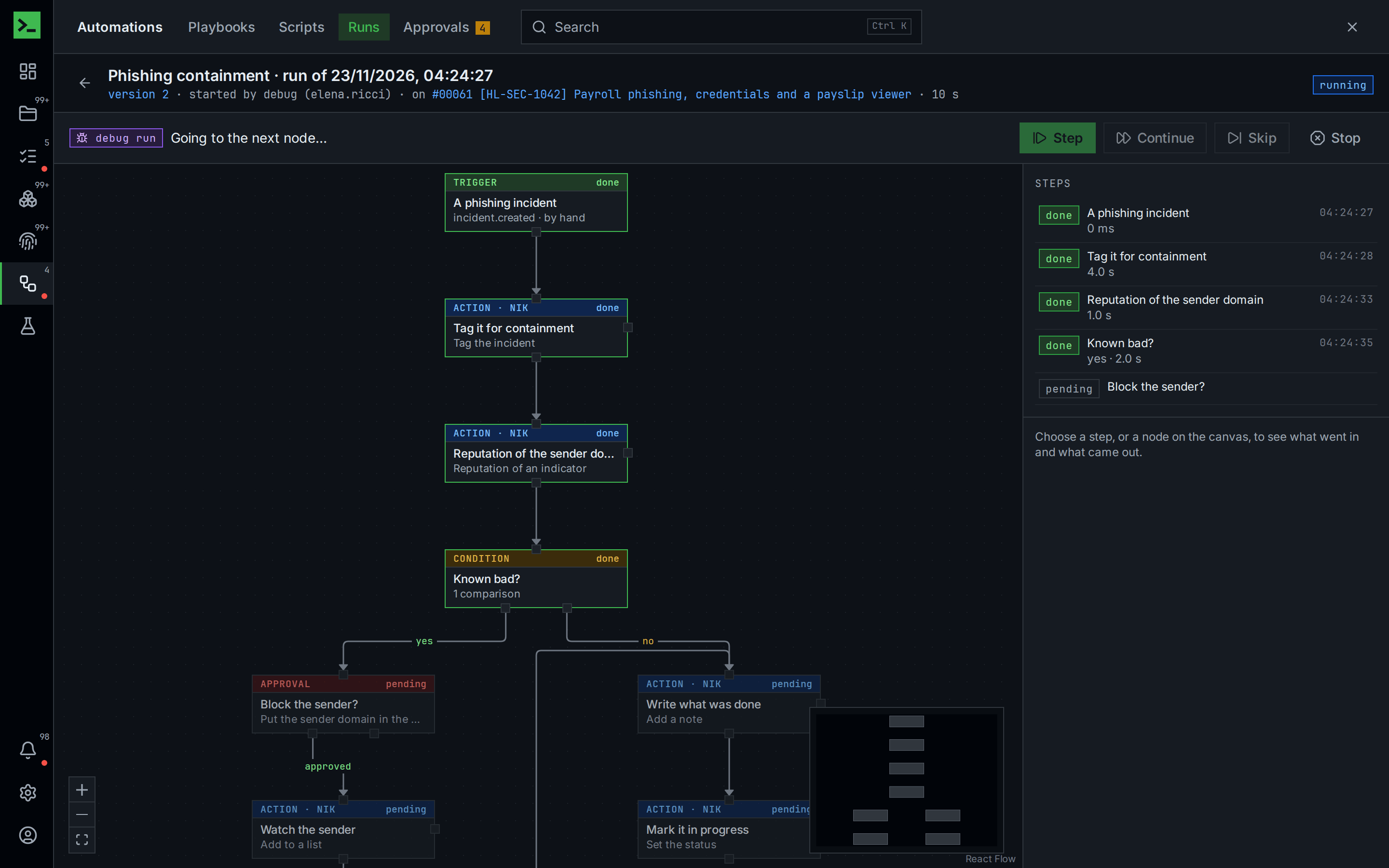
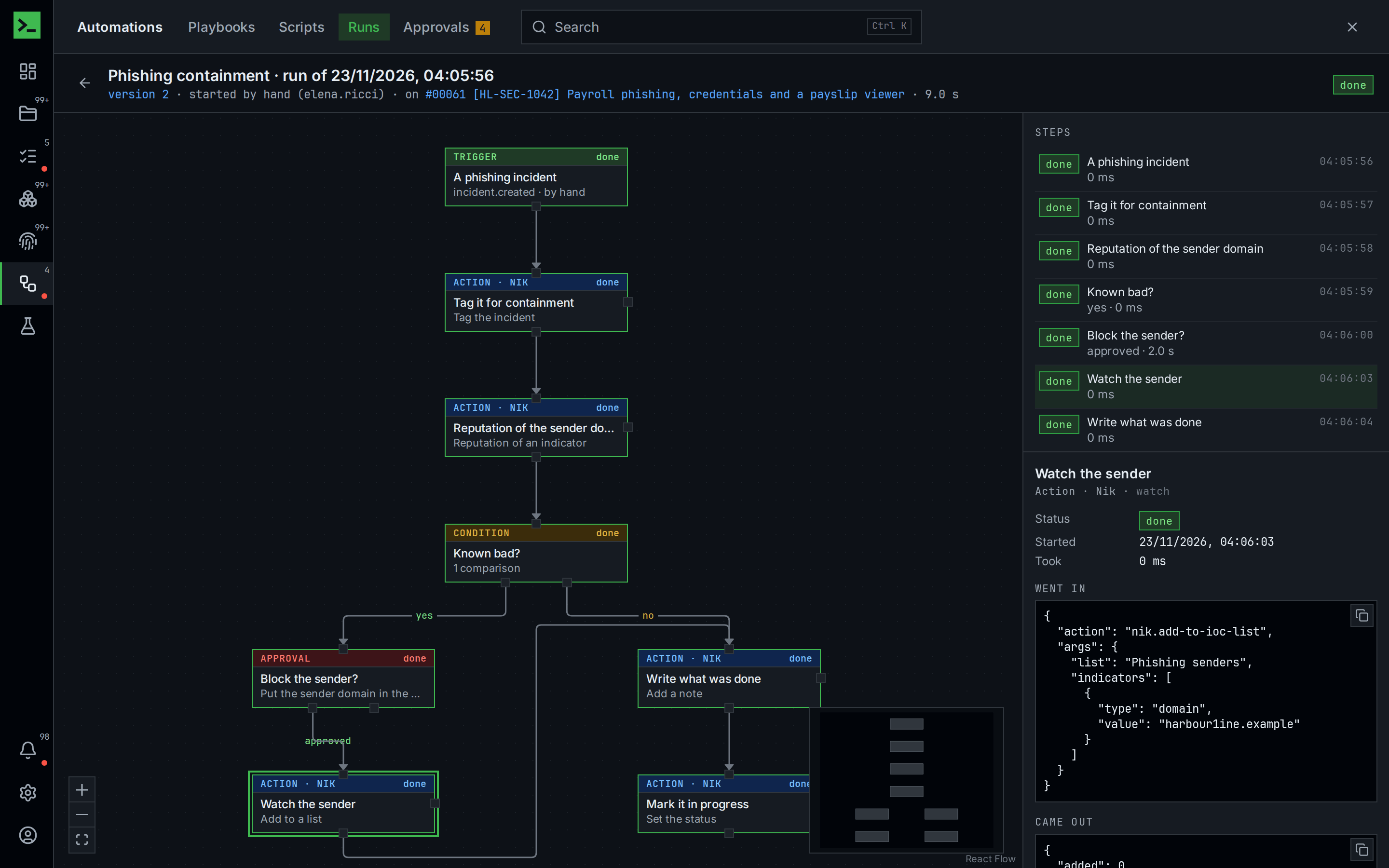
A finished playbook looks like this on the canvas. The pictures on this page show Phishing containment, a smaller playbook shipped with the examples, built the same way: a trigger, actions, a condition with yes and no, an approval.
You need
- The Playbooks role, to build; Analyst too, to try it on an incident.
- At least one threat-intelligence source on (Threat intelligence). Without one, every verdict is empty and the playbook takes its no branches, which is still a good test.
- An account to assign incidents to. This page uses
soc-lead: use one of yours.
1. Create the playbook
- Open Automations › Playbooks, press New playbook.
- Name:
Phishing: check and contain. Description:Checks the indicators of a new phishing incident; asks before blocking.Press Create.
The canvas opens with the Trigger. Every change saves itself as a draft.
2. The trigger
- Select the Trigger.
- On an event: An incident is created · incident.created.
- Turn on Can be run by hand: you will try it on an existing incident.
The event does not carry the type of the incident, so the type is tested in the next node.
3. Only phishing incidents
- Open Flow in the library and click Condition: it lands under the trigger, joined to it.
- In the inspector: Name
Phishing?, Idis_phishing. - Under Goes "yes" when, write one comparison:
{{ incident.type }}isphishing. - Add an End node. The run ends as done, Message
Not a phishing incident.Draw the no port ofPhishing?to it.
{{ incident.… }} reads the incident of the run as it is now, every field by its name. phishing is the id of the shipped Phishing type; a type of yours has its own id (see Platform settings › Incidents › Types).
4. Find the indicators
- Open Commands › Nik, add Make indicators of a text, and draw yes of
Phishing?to it. - Id
found. - text:
{{ incident.name }} {{ incident.details | default("") }} - leave_out_harmless: on (private addresses, your own domains and the allowlist are left out).
It gives found.indicators: a list of {type, value, new, marks}. It is safe to run twice: an indicator Nik knows is linked, not made again.
Why | default("")
A field with no value is not there when the step runs, and a path that leads nowhere fails the step. default gives an empty text instead.
5. Check each indicator
- From Flow, add For each after
found. Ideach_ioc. - For each item of:
{{ found.indicators }}. At most:100. - Turn on Go on with the other items when one fails.
- Add Reputation of an indicator (Commands › Nik) and draw the for each item port of
each_iocto it. Idcheck. - kind:
{{ item.type | map(md5='file', sha1='file', sha256='file') }}(a hash is looked up as a file; the other types keep their name). - value:
{{ item.value }}. - If it fails: Try again,
3times.
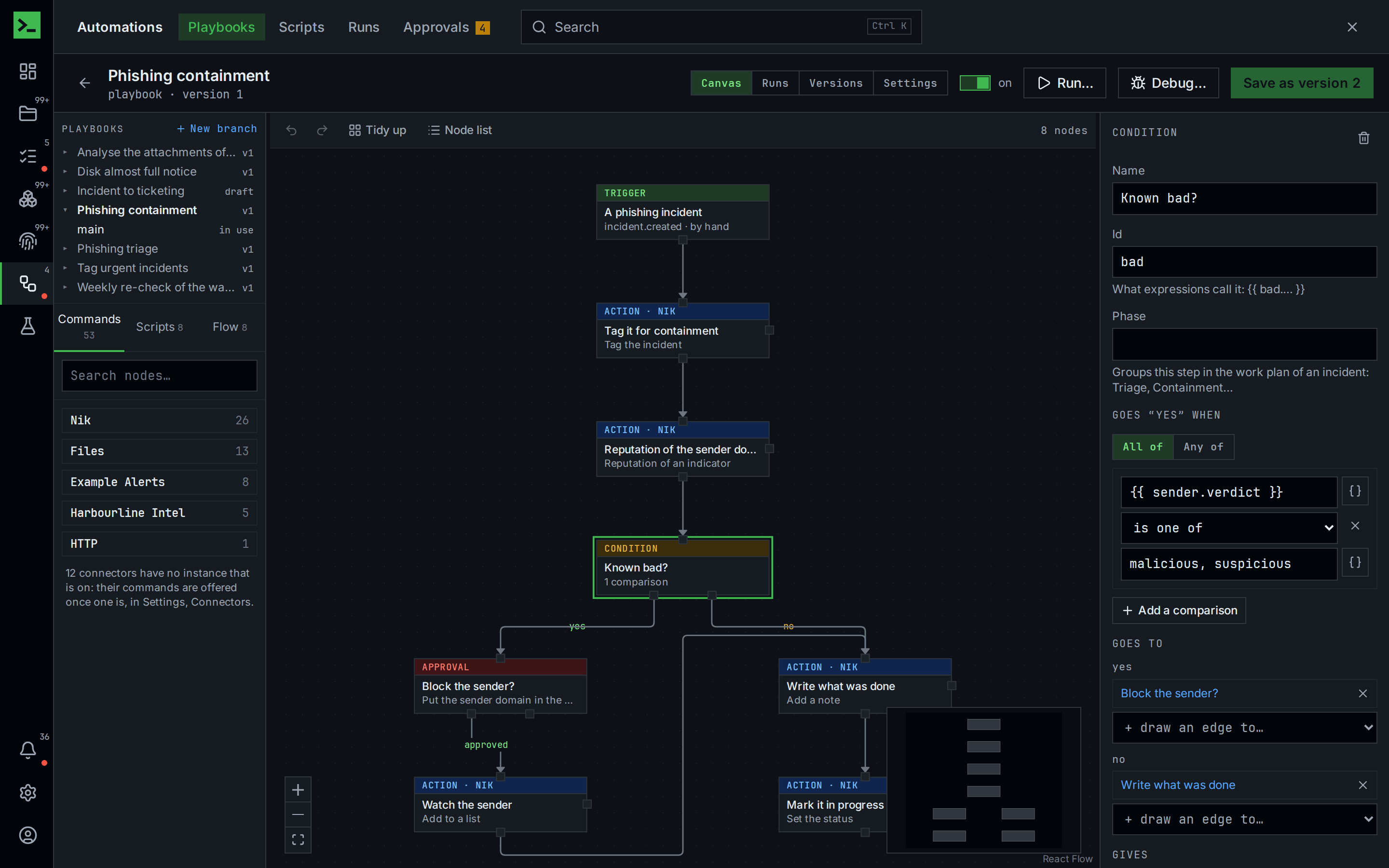
Inside the loop, {{ item }} is the current indicator. After the loop, {{ each_ioc.results }} is what check gave for each item, in order: each with verdict, score, value, sources.
6. Decide
- Add a Condition and draw when done of
each_iocto it. NameAnything malicious?, Idany_bad. - Comparison:
{{ each_ioc.results | where("verdict", "eq", "malicious") | length }}is more than0. - Add an End (done,
Nothing malicious.) on its no port.
7. Tag, assign, note
On the yes port of any_bad, add one after the other:
- Tag the incident, Id
tag, tagsphishing-confirmed. - Assign the incident, Id
assign, assigneesoc-lead. -
Add a note, Id
note, text:
Leave incident empty in each: it is the incident of the run.
8. Ask before blocking
- Add an Approval after
note. Idask_block. - Question:
Put the malicious values on the Blocked list? - Detail:
{{ each_ioc.results | where("verdict", "eq", "malicious") | pluck("value") | join(", ") }} - Waits: For 4 hours. When the wait ends: go on as refused.
- On approved, add Add to a list (the one described Put indicators in a watch list). Id
block. list:Blocked. indicators:{{ each_ioc.results | where("verdict", "eq", "malicious") | pluck("value") }}.
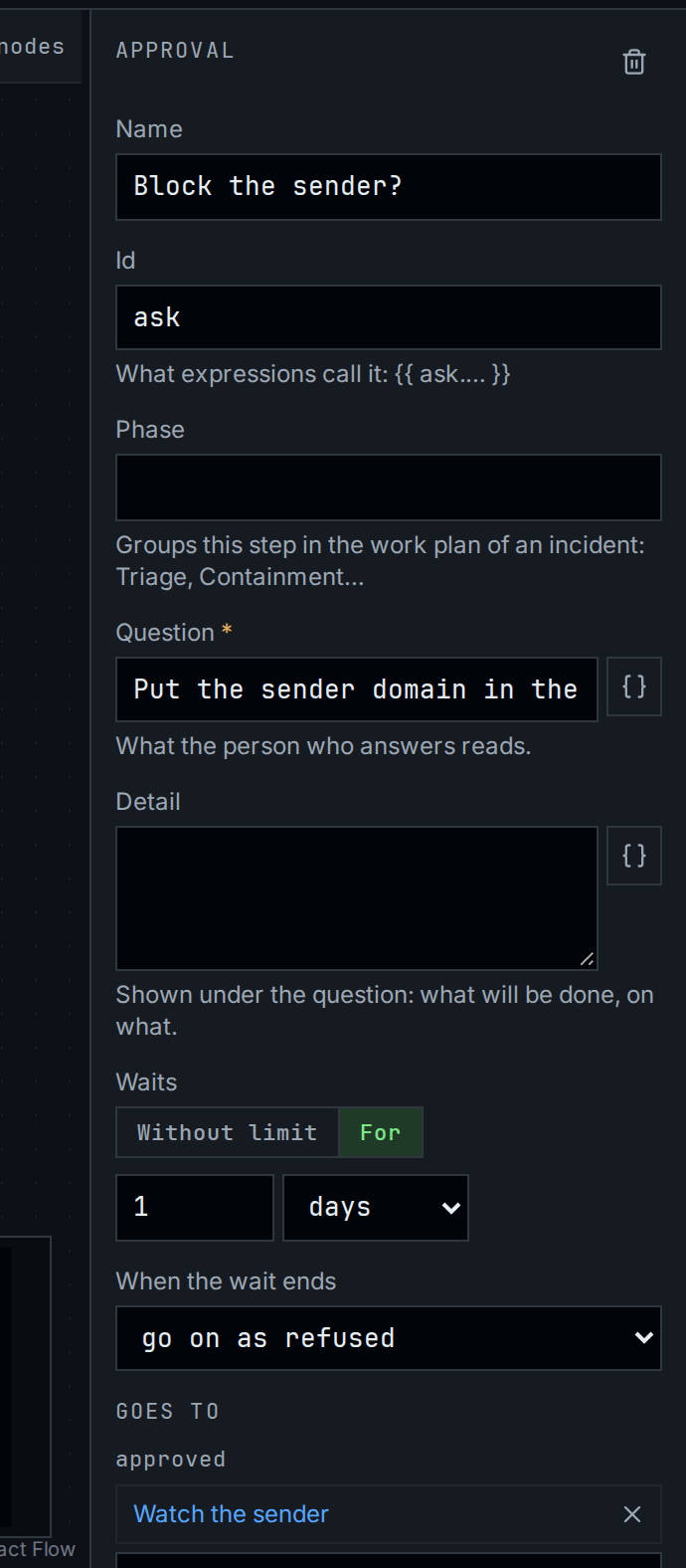
The watch list Blocked is made if there is none. A firewall that reads a list from Nik, or a connector command placed here instead (Check Point, Zscaler…), turns it into a real block: such a command changes something outside, and asks for its own approval by default.
9. Handle an error
- Select
block. If it fails: Stop at once. - Add Add a note (Id
block_failed), textBlocking failed: {{ block.error }}. - Draw the on error square, on the right side of
block, toblock_failed.
A failed node gives error (what went wrong) to the node on its error line. Without the line, the run ends as failed.
10. Save a version
Press Tidy up, then Save as version 1.
If something is wrong, nothing is saved: the nodes show N to fix and the inspector says what. Messages you may meet here:
| Message | Fix |
|---|---|
"value" is required |
Fill the argument (marked on the node) |
"check" runs once per item: read the results of "each_ioc" instead |
After the loop, read each_ioc.results, not check |
"tag" is not certain to have run before this node |
Read only nodes every path to this one passes through |
"chek" is not a node of this playbook |
A typo, or the Id changed: correct the expression |
Nothing leads to this node |
Draw its line, or delete it |
A step of a "for each" body cannot also come after the loop |
Draw the line after the loop from when done, not from a node of the body |
11. Dry run
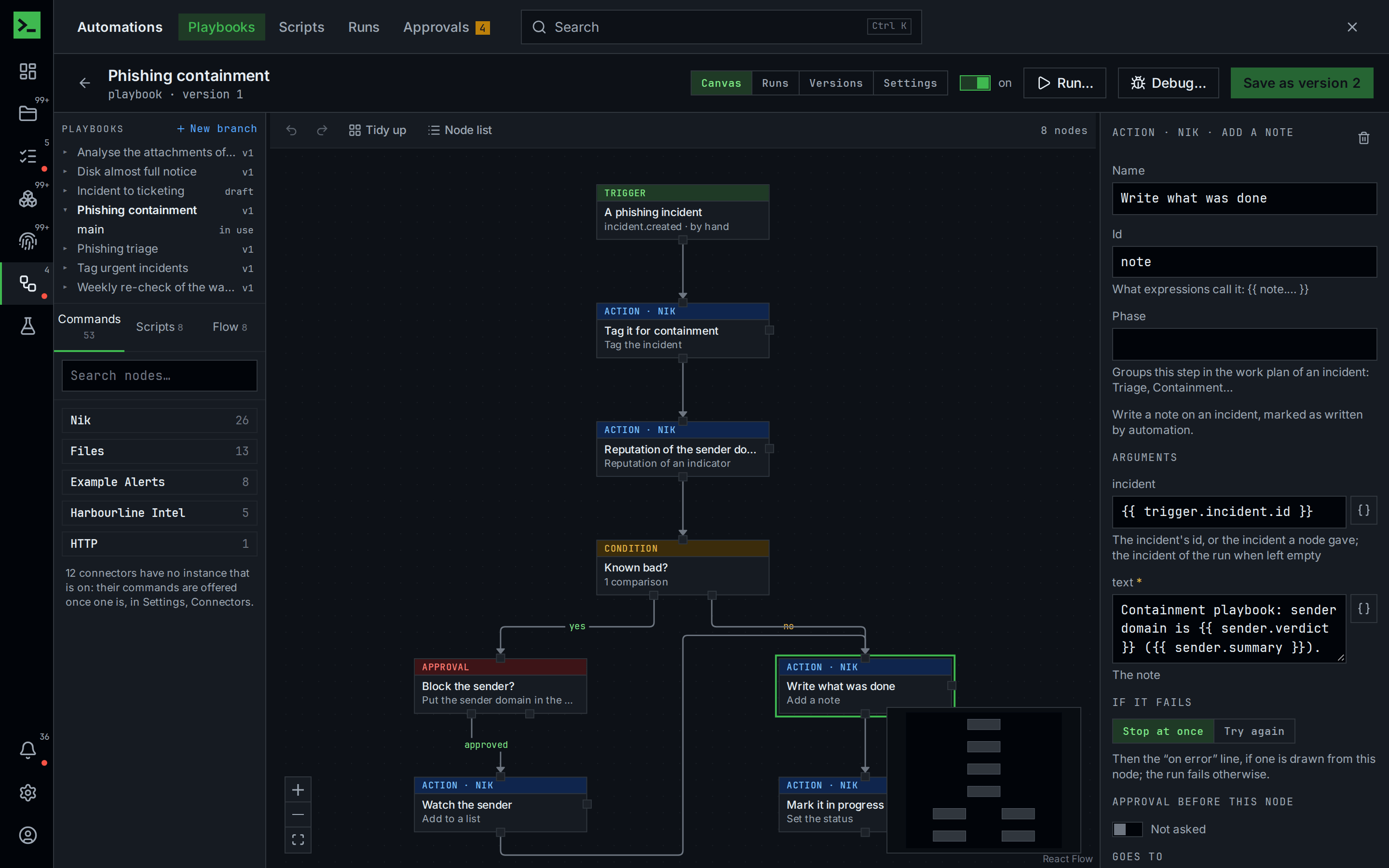
- Press Run…. On which incident: choose a phishing incident with a few links in it.
- Tick Dry run, press Start the dry run.
- Read the run:
foundshows the indicators it would make; eachcheckshows a verdict; nothing was tagged, assigned or added.
What a dry run does not show
A dry run asks no source: check gives what Nik already holds, often nothing, so the run usually ends at Nothing malicious. To walk the yes path, use the debugger.
12. Walk the yes path in the debugger
- Press Debug…. What to run: the draft. On: the same incident. Where to stop: Before every node, one at a time.
- Press Continue until
any_bad. - Select the step of
each_ioc. In What it gave, change oneverdicttomalicious, and press Write it. - Step: the condition takes yes. Go on with Step and read each node. A debug run holds what would go outside, as a dry run does, and counts for no limit.
13. Turn it on and read the runs
- Flip the switch to on.
- Create a test incident of type Phishing with a known-bad test value in its details. The playbook starts.
- Automations › Approvals (and the top of the incident) shows Put the malicious values on the Blocked list?. Press Approve.
- Open Automations › Runs, then the run: green nodes are done; select one for Went in, Came out and the Log.
Limits
The playbook starts 60 runs an hour by default (Settings › Limits and approvals). A bulk creation of incidents beyond that starts nothing for the rest.
14. Make a part reusable: inputs and outputs
A check you want in several playbooks can be a playbook of its own, run by others.
- Create a playbook
Check one indicator. Its trigger has no event; turn on Can be run by hand. - With no node selected, under Inputs, add
value(text, required) andkind(text, required). - Add Reputation of an indicator (Id
check): kind{{ inputs.kind }}, value{{ inputs.value }}. - Under Outputs, add
verdictfrom{{ check.verdict }}andscorefrom{{ check.score }}. Save a version. - In the main playbook, replace
checkby Run another playbook: PlaybookCheck one indicator, Inputs given to itvalue={{ item.value }},kind={{ item.type | map(md5='file', sha1='file', sha256='file') }}, Wait for it to finish on. It gives{{ node.result.verdict }}.
Playbooks call each other five deep at most; a circle is refused when the version is saved.
15. Share it as a file
- Open the playbook's Settings, press Export: a JSON file.
- On another Nik, Automations › Playbooks › Import brings it in as a draft, off.
- Save a version there. What it may reach and send is never in the file: an admin opens it again where it is imported.
To carry it with its scripts and connectors, put it in a pack: A content pack.