Act on many at once
Select many incidents, artifacts or indicators and change them in one go: close, assign, tag, check, export, delete.
The three lists work the same way: the list of incidents, the artifacts panel, and the Indicators page (and the Indicators tab of an incident).
Select rows
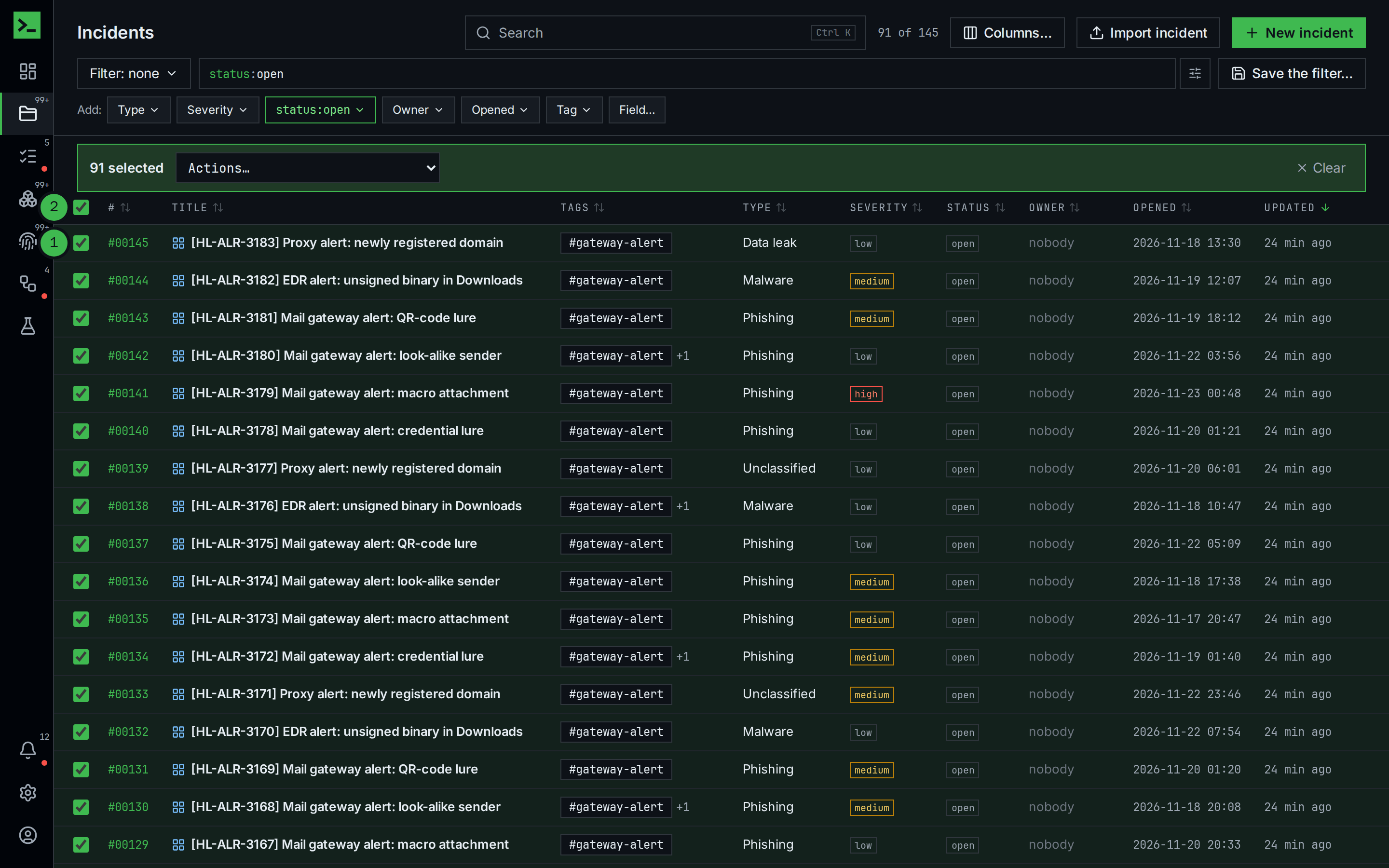
- Tick a row: click its checkbox 1. A click anywhere else on the row still opens it as usual.
- Tick a range: Shift and click another checkbox. Every row between the last ticked one and this one is ticked.
- Tick the rows on screen: the checkbox in the heading 2. It is half ticked when only some are.
- Tick everything the filter keeps: when every row on screen is ticked and the filter keeps more, the bar offers Select all 1,284 that match. The server then works out which they are from the filter, not from what your browser has loaded. In the picture all 91 rows fit on the page, so the bar does not offer it.
With the keyboard, on a row:
| Key | Does |
|---|---|
| Space | Ticks or unticks the row |
| Shift+Down / Shift+Up | Ticks the next row too and moves there |
| Ctrl+A (Cmd+A) | Ticks the rows on screen |
| Esc | Unticks everything |
The selection lives inside one filter
It survives another order of the rows and the next page. It is emptied when the filter changes (the list says The filter changed: the selection was cleared.), once an action on it has started, and when you leave the page. Nothing selected in one list is ever acted on from another.
The bar
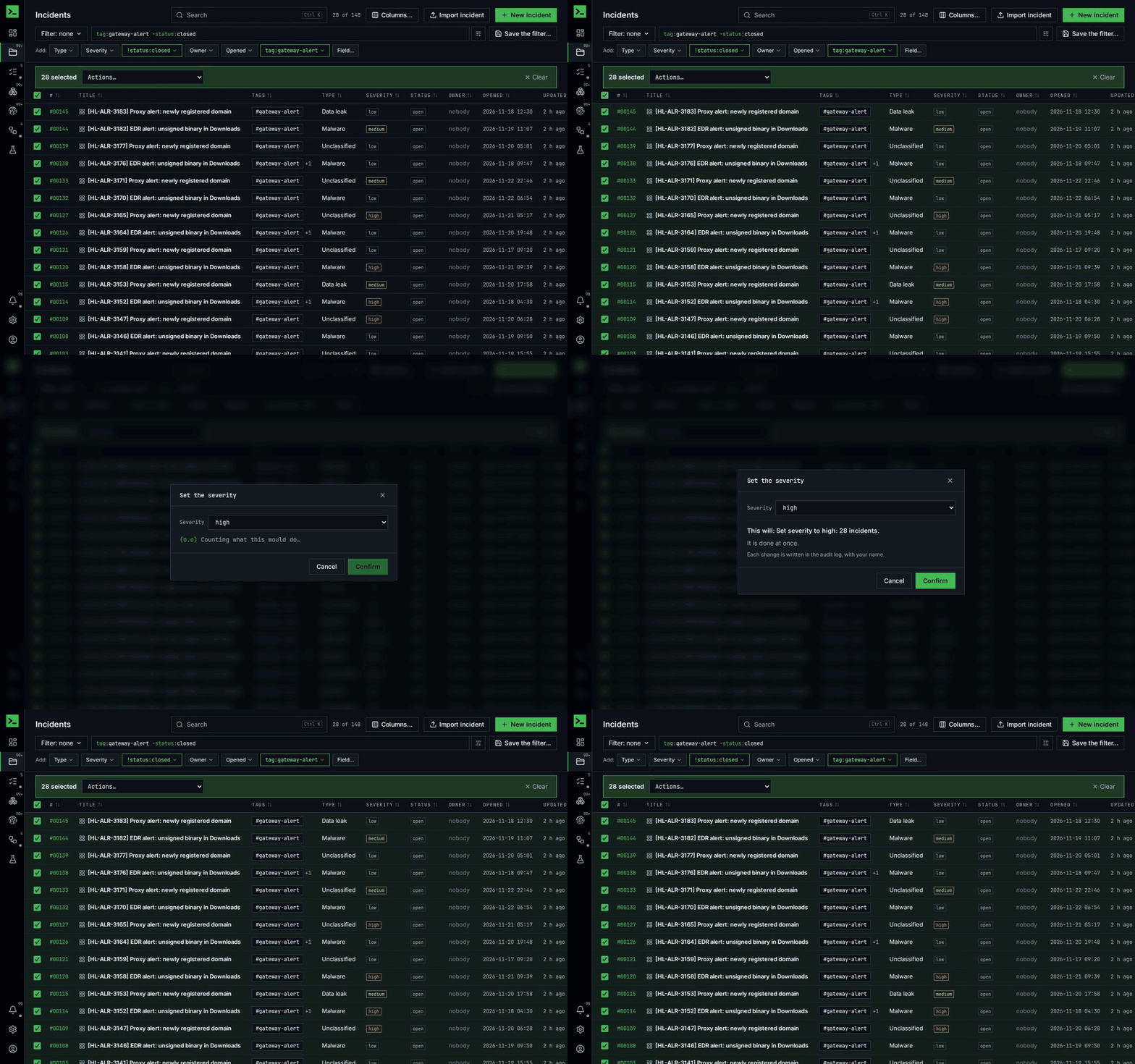
As soon as a row is ticked, a bar appears over the list:
12 selected · Select all … that match · Actions… · Clear
Actions… lists only what your roles let you do. A viewer can select and take out (export, copy), nothing more; the bar then says Your roles let you read, not change.
What you can do
| Group | Action |
|---|---|
| Triage | Set the status…, Close…, Set the severity…, Assign… (me, someone, Nobody (remove the owner)), Set the type…, Set the TLP…, Change the tags…, Set another field… |
| Evidence and mirroring | Find indicators now, Change mirroring… (In, Out, In-out, None (stop mirroring)) |
| Automation | Run a playbook on each… |
| Take out | Export (JSON) (25 at a time, one file each), Copy the links, Delete… |
Close… asks the reason and the notes once. When all the incidents are of one type, it also offers that type's reasons and the fields it wants filled to close.
Set another field… takes any field that holds one plain value. Out and In-out mirroring need the right to run playbooks, as on one incident.
| Action | |
|---|---|
| Change the tags… | Add and remove tags |
| Analyse again | Files and e-mails |
| Link to an incident… / Take out of an incident… | |
| Set the expiry… | The day they are deleted on, or none |
| Download together… | One archive made by the server, the files inside an encrypted zip. 500 artifacts at most; the dialog states the size limit. |
| Delete… |
| Action | |
|---|---|
| Check now… | Asks the sources; first says what it costs each source |
| Analyse the addresses… | The isolated browser visits the URLs |
| Change the tags…, Set the TLP… | |
| Add to a list…, Save as a new list…, Take out of this list… | |
| Add to the allowlist… | |
| Export…, Copy the values | |
| Remove from the library… |
On the Indicators tab of an incident there is also Remove from this incident…, for the indicators found by themselves: they are not found again there.
Not offered on many at once
What needs its own answer for each incident: its name and ticket, fields made of parts (tables, JSON, tags of hosts and users), starting a mirror (each has its own ticket on the other side), a script button, a War Room command, its report.
Confirm
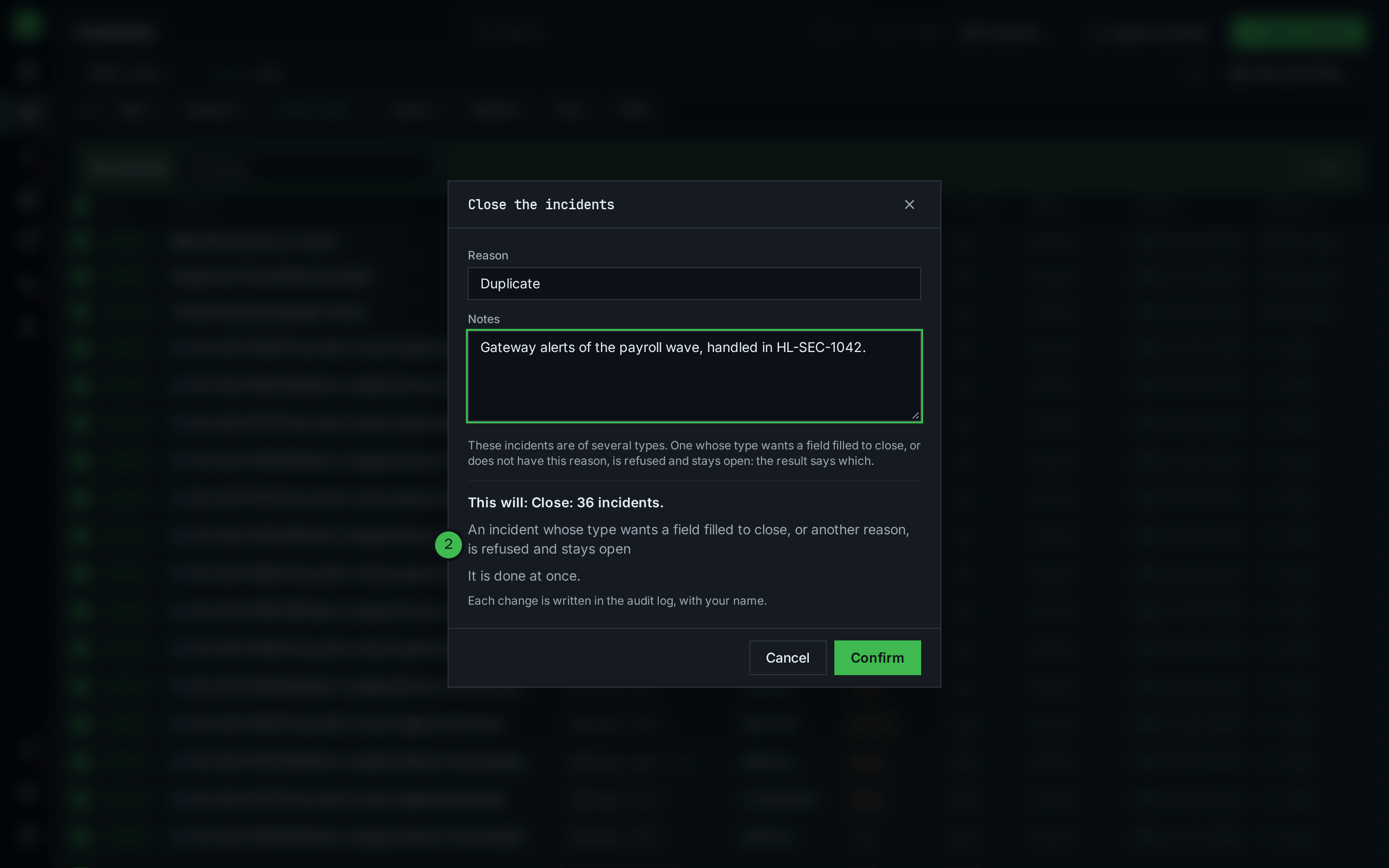
- Choose an action in Actions….
- Fill in what it needs: the tags, the reason, the list, the playbook…
- Read what it will do, under the form 2:
- how many it applies to (
It applies to 9 of 12); - what it sets in motion:
38 of these are mirrored Out: their tickets will be updated, one update for each; for a check, the requests it costs each source against today's quota.
- how many it applies to (
- For a delete, or a close of more than 100 incidents, type the words the dialog shows (
delete 12). Below 100, as in the picture, there is no such field. - Click Confirm.
Warning
One action takes 5,000 rows at most: beyond that the dialog says to narrow the filter. If you selected everything a filter keeps and it changed while the dialog was open, nothing is done and the dialog shows the new count.
How it runs
- Each row goes through exactly what changing it alone goes through: the same checks and permission, its own line in the audit log, the same events for playbooks, the same update to a mirrored ticket.
- Up to 50 rows are done before the dialog closes.
- More goes on in the background. Its progress is in the Transfers tray at the foot of the window; you can keep working. After a restart of the server it goes on from the row it had reached, without doing any row twice.
- One bulk action of yours runs at a time on each list.
What it did
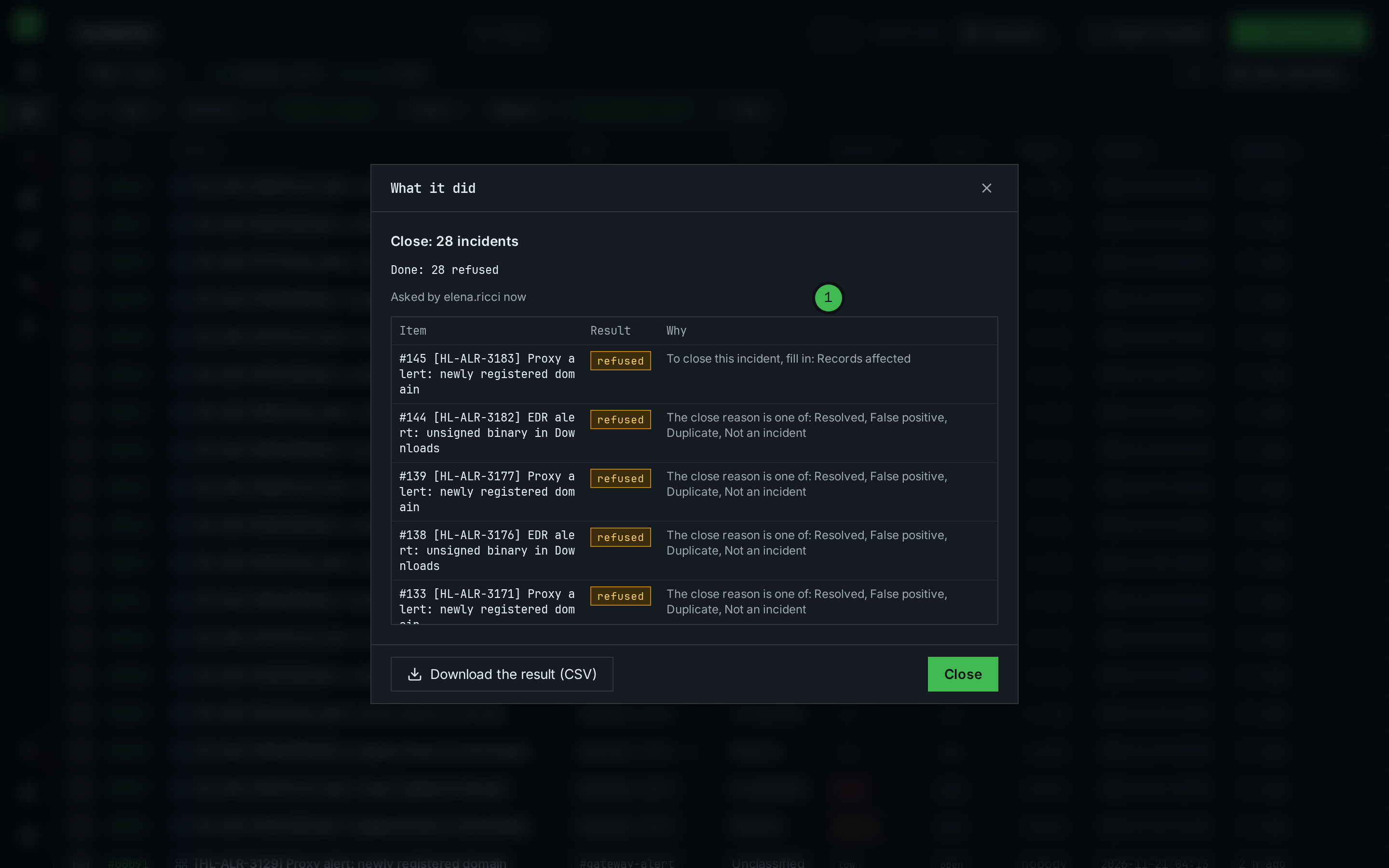
When every row was done, a notice says so. Otherwise What it did opens:
- how many were done, skipped (already so, or not for them), refused (a rule of a field, a type that wants something filled to close, a permission: with the sentence) and failed;
- the rows not done, with the reason for each 1;
- Download the result (CSV) for all of them.
Nothing is undone when some rows fail: the others stay changed.
- Try again on the N not done makes a new job of the rows that failed or were never reached. When every row was refused, as in the picture, there is nothing to try again and the button is not shown.
- Stop it, on a running job, ends it after the row it is on. What was done stays.
Every job of the last month
Platform settings › System › Bulk actions lists the bulk actions, newest first: what was asked, of how many, by whom, how it went. A row opens What it did, with the CSV, Stop it and Try again. You see your own; an administrator, and whoever reads the audit log, can tick Everybody's, not only mine. A job is kept for a month.
Details: the limits (administrators)
At the foot of Bulk actions, administrators set how many rows one action takes (5,000), up to how many are done before the dialog closes (50), and above how many a close is confirmed by typing (100; deleting always is).
The same jobs can be started through the API: see API.